
Understanding How to Implement Progressive Web Apps for Faster Mobile Healthcare Experiences
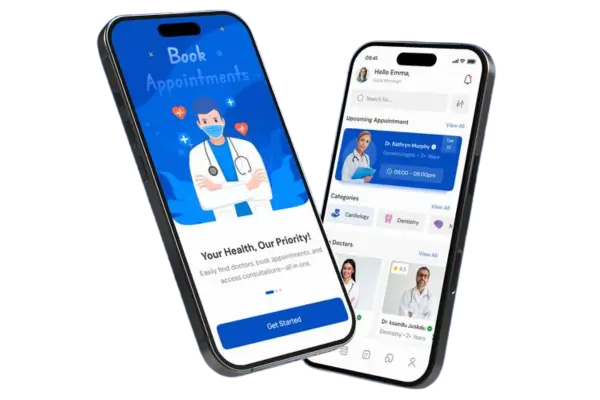
Progressive Web Apps, often called PWAs, are changing the way we interact with mobile applications. In healthcare, speed, reliability, and accessibility are essential. Patients and doctors need information quickly, and delays can affect care. A PWA combines the best of web and mobile apps, giving users fast loading times, offline access, and smooth experiences. Unlike traditional apps that require downloading from app stores, PWAs are easily accessible via a web browser and can even be installed on a device without taking up much space. Many healthcare providers are now exploring PWAs because they allow patients to check appointments, get prescriptions, or read medical advice instantly. Tools like Google Lighthouse can measure the performance of your PWA, while frameworks like React or Angular help in building interactive user interfaces. An example of a healthcare PWA is the “Apollo 24/7” app in India, which gives patients quick access to consultations and lab results through a fast and responsive interface.
1. Benefits of Progressive Web Apps in Healthcare
Progressive Web Apps offer unique benefits that traditional mobile apps cannot match. One major advantage is speed. PWAs load almost instantly, even on slow networks, which is crucial for healthcare users who may not always have strong internet connections. Patients can access lab results, schedule appointments, or check symptoms without waiting for a full app to open. PWAs also work offline, using service workers to store essential data locally. This ensures that even if connectivity is lost, users can continue interacting with critical healthcare features. For developers, tools like Workbox simplify implementing offline caching, and platforms like Firebase provide backend support for real-time updates. Fast loading and offline functionality also reduce bounce rates and improve patient satisfaction. Companies like Practo have experimented with PWA features to make their services faster and easier to use across different devices. By focusing on the user experience, healthcare organizations can save time and provide more responsive care.
1.1 Faster Access to Medical Records
One of the most important benefits of PWAs is the ability to access medical records quickly. Traditional apps often require multiple steps to log in and load data, which can be frustrating. PWAs, on the other hand, can cache records so that patients can see their history almost instantly. This is particularly helpful in emergencies where doctors need to view a patient’s previous tests or prescriptions. Tools like IndexedDB allow developers to store large amounts of data on the user’s device safely, while Firebase Authentication ensures secure login processes. A practical example is the “HealthTap” app, which provides users with instant access to consultations and medical information through a PWA. By improving record access speed, patients feel more empowered and doctors can make faster decisions, enhancing overall care quality.
1.2 Seamless Appointment Scheduling
Scheduling appointments is often a slow and cumbersome process with traditional apps or hospital websites. PWAs make this process smoother by providing immediate feedback and a more interactive interface. Patients can check available slots, book appointments, and even receive reminders directly on their device. This functionality is made possible using front-end frameworks like Vue.js or Angular combined with back-end solutions such as Node.js for real-time updates. The app “Zocdoc” demonstrates how a healthcare provider can streamline scheduling via a PWA, making it easier for patients to manage appointments without delays. Even healthcare SEO companies are starting to recommend PWAs as part of digital strategies because they improve accessibility and engagement for users.
1.3 Offline Capabilities for Remote Areas
Many patients live in areas with unreliable internet connections, which can prevent them from using standard mobile apps. PWAs solve this problem by enabling offline functionality. When users visit a PWA for the first time, service workers can cache important resources, allowing the app to work even when there’s no connectivity. This is particularly helpful for rural healthcare programs or telemedicine services. Tools like Workbox make offline caching easier to implement, while apps like “1mg” in India allow users to read drug information or check health tips even without an active connection. Offline capabilities ensure continuous access to health information, improving patient trust and satisfaction.
1.4 Push Notifications for Health Updates
Push notifications are a powerful feature of PWAs that keep patients informed. They can receive reminders for medication, upcoming appointments, or health alerts instantly. Unlike email or SMS, push notifications are interactive and appear directly on the user’s home screen. Services like Firebase Cloud Messaging allow developers to send targeted notifications, and examples like the “MyChart” app in the U.S. show how timely alerts can enhance patient engagement. These notifications help patients follow treatment plans effectively and prevent missed appointments or doses, improving overall healthcare outcomes.
1.5 Cost-Effective Development
Developing and maintaining traditional mobile apps for multiple platforms can be expensive. PWAs, however, work across all devices with a single codebase. This reduces development time and costs significantly. Using frameworks like React, Angular, or Vue, developers can create responsive and interactive apps that function like native applications. Tools like Lighthouse and Chrome DevTools help monitor performance, ensuring the app runs efficiently. Cost-effective development makes it easier for smaller clinics or startups to adopt modern digital solutions without heavy budgets. PWAs allow healthcare providers to focus more on patient care rather than worrying about app updates or platform compatibility.
1.6 Better Engagement Through Responsive Design
PWAs adapt seamlessly to different screen sizes, whether a patient is using a smartphone, tablet, or desktop. This responsive design improves user experience by making navigation easy and content readable on any device. Frameworks like Bootstrap or Material UI simplify creating responsive layouts, while Google’s Lighthouse can audit performance and accessibility. Apps like “Ada Health” leverage responsive PWAs to offer symptom checkers and personalized advice, ensuring users stay engaged. High engagement levels lead to better patient education and adherence to treatment, which are key goals for any healthcare provider.
2. Steps to Implement Progressive Web Apps for Healthcare
Implementing a PWA requires a clear plan, proper tools, and careful attention to user experience. The first step is planning features that patients actually need. This involves analyzing existing apps, conducting surveys, and identifying pain points like slow loading times or cumbersome navigation. Using tools like Figma or Adobe XD can help design intuitive interfaces before coding starts. After planning, developers choose frameworks such as React, Angular, or Vue to build the app. The backend should support offline capabilities, push notifications, and real-time updates. Firebase and Node.js are commonly used tools for these purposes. Testing and monitoring performance using Lighthouse or WebPageTest ensures the app meets speed and usability standards. A PWA implementation in healthcare should always focus on speed, accessibility, and data security. Examples like “Mayo Clinic” PWA showcase how patient engagement and experience can improve drastically with careful planning.
2.1 Service Workers and Offline Support
Service workers are the backbone of PWA offline functionality. They intercept network requests and serve cached content, allowing users to access the app even without internet. Implementing service workers requires understanding JavaScript and caching strategies. Tools like Workbox provide prebuilt libraries to simplify coding service workers, enabling caching for critical assets like images, scripts, and patient data securely. For instance, “1mg” PWA uses service workers to allow offline reading of medicine guides. Properly configured service workers ensure a seamless experience, preventing frustration for patients in areas with intermittent connectivity.
2.2 App Shell Model for Fast Loading
The app shell model ensures that a PWA loads quickly by separating the core structure from dynamic content. When a user opens the app, the shell loads first, providing immediate interface visibility while content fetches in the background. This approach is essential for healthcare apps where quick access to information can be life-saving. Frameworks like Angular and React support app shell architecture, and tools like Lighthouse can test loading speed. “Apollo 24/7” PWA demonstrates this model by showing the interface instantly while lab results or consultation data load, reducing wait time for users.
2.3 Push Notification Integration
Adding push notifications requires backend support and user permissions. Firebase Cloud Messaging (FCM) allows developers to send notifications effectively and securely. Healthcare apps can send reminders, alerts, or updates, improving patient engagement. For example, “MyChart” PWA sends notifications about upcoming appointments or medication schedules. Proper integration of push notifications helps patients stay on track with their treatment plans without feeling overwhelmed by too many messages.
2.4 Security and Data Protection
Healthcare apps deal with sensitive patient data, so security is a priority. PWAs should use HTTPS to encrypt communication and store sensitive data safely. Authentication mechanisms like Firebase Authentication or OAuth ensure secure logins. GDPR and HIPAA compliance must also be considered during development. For instance, apps like “HealthTap” implement secure protocols for data storage and access, ensuring patient confidentiality. Strong security builds trust between patients and healthcare providers, which is crucial for adoption.
2.5 Testing and Performance Monitoring
Testing a PWA is crucial for identifying and fixing issues before launch. Tools like Google Lighthouse, WebPageTest, and BrowserStack can evaluate performance, accessibility, and cross-browser compatibility. Continuous monitoring after launch ensures the app remains fast and responsive. For healthcare apps, slow performance can negatively impact patient experience, so constant testing and updates are necessary. Examples like “Ada Health” PWA show the value of iterative testing to maintain a seamless experience for users.
2.6 Continuous Updates and Improvements
PWAs can update silently in the background, providing new features without requiring users to download app updates manually. Developers can push enhancements to improve functionality, performance, and security. Tools like Workbox or Firebase Hosting help manage these updates efficiently. By continuously improving the app, healthcare providers can respond to patient feedback and changing needs, ensuring that the PWA remains relevant and effective over time.
2.7 Analytics and User Feedback
Tracking user interactions and collecting feedback helps refine the app. Google Analytics or Firebase Analytics can monitor user behavior, while surveys or feedback forms collect patient opinions. Insights from analytics guide updates and feature improvements. For example, if users often exit during appointment booking, the process can be simplified. Engaging users with better experiences enhances satisfaction and helps healthcare organizations deliver better services consistently.
3. Conclusion
Progressive Web Apps offer a modern, fast, and reliable way to improve healthcare experiences on mobile devices. With fast loading times, offline support, push notifications, and cost-effective development, PWAs are ideal for hospitals, clinics, and telemedicine platforms. Implementing PWAs requires planning, the right tools, and continuous monitoring to ensure users get seamless and secure access to medical information. By following steps like using service workers, the app shell model, secure authentication, and continuous updates, healthcare providers can create apps that patients love. Examples like Apollo 24/7, MyChart, and Ada Health show how PWAs can transform healthcare delivery. Ultimately, PWAs enhance patient engagement, streamline processes, and provide fast access to critical information, making healthcare more accessible and efficient for everyone.









