
Understanding How to Optimize Large Medical Blogs for Core Web Vitals
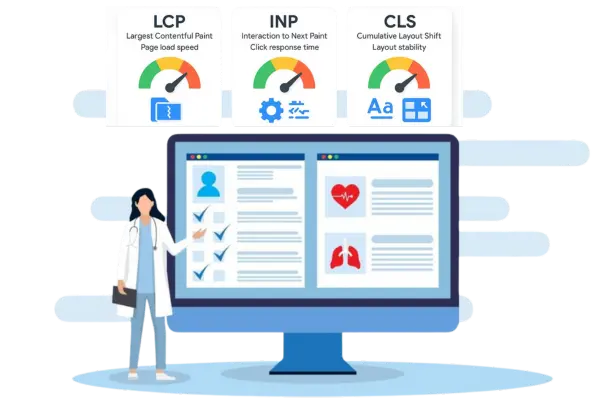
Optimizing a large medical blog is not just about writing good content. It is about making sure your website loads fast, works smoothly, and gives readers a great experience. Core Web Vitals are a set of key metrics that Google uses to measure user experience. These include loading speed, interactivity, and visual stability. If your site scores well on these metrics, it can rank higher in search results, get more visitors, and keep readers engaged. Large medical blogs face unique challenges because they often have many images, videos, charts, and long articles. In this blog, we will break down simple, practical steps to improve Core Web Vitals on medical blogs using easy-to-understand explanations and real-world examples.
1. Improving Page Loading Speed
Before looking at tools or strategies, we must understand why page loading speed matters. Visitors don’t wait long for a page to load. If your blog takes more than three seconds, people might leave. For large medical blogs, heavy images, embedded videos, and complex charts can slow down pages. Optimizing these elements is critical. Websites like GTmetrix or Google PageSpeed Insights can show exactly which parts of your pages are slow. For example, if a CT scan image is 5 MB, it should be compressed to under 500 KB using tools like TinyPNG or ShortPixel. Speeding up a blog improves both user experience and search engine rankings. Even top hospitals use simple techniques to compress images and optimize scripts to ensure visitors can read medical content without frustration.
1.1 Compressing Images and Videos
Images and videos are often the heaviest parts of medical blogs. Large MRI scans or surgery videos can make pages load very slowly. Tools like Imagify or Kraken.io can compress these files without losing quality. You can also use modern image formats like WebP for better performance. For videos, hosting them on YouTube or Vimeo instead of your own server can reduce page weight. For example, Johns Hopkins Medicine’s blog uses compressed diagrams and WebP images to make their pages load fast. Even using a simple plugin like WP Rocket for WordPress can help load images only when they are visible, which improves speed.
1.2 Minifying CSS and JavaScript
Websites often have extra code that isn’t necessary. Minifying CSS and JavaScript removes these extra spaces and lines of code, which makes pages load faster. Tools like UglifyJS or CSSNano can do this automatically. For instance, if a medical blog has a chart showing heart disease statistics, the code controlling animations may slow the page. Minifying that code helps the chart load instantly. Many website builders and CMS platforms include plugins to handle this automatically. Using these tools ensures your blog is fast even when you have dozens of interactive charts on one page.
1.3 Leveraging Browser Caching
Browser caching stores parts of your website on a visitor’s computer so it doesn’t need to load everything every time. For large blogs, caching can reduce load time significantly. Plugins like W3 Total Cache or Cache Enabler help with this. If a visitor reads multiple articles about diabetes management, caching ensures they don’t wait again for the same images and scripts. This small step can improve Core Web Vitals scores quickly. Hospitals and clinics often use this technique to keep patient education pages accessible and fast.
1.4 Using a Content Delivery Network
A Content Delivery Network (CDN) stores your website on multiple servers worldwide. When someone opens your blog, the nearest server sends the data, making pages faster. Services like Cloudflare, KeyCDN, or StackPath are popular options. For example, a user in New York visiting a medical blog hosted in California will get the page from a closer server, reducing delay. This is especially helpful for large blogs with thousands of articles, ensuring consistent speed for all visitors. Even small medical practices benefit from CDNs to deliver content efficiently.
1.5 Optimizing Fonts
Fonts can also slow down pages, especially if your blog uses multiple styles or sizes. Google Fonts and Adobe Fonts offer easy ways to load fonts efficiently. Using system fonts or limiting the number of font styles can reduce loading time. For example, Mayo Clinic uses simple fonts across its blog, which makes the text easy to read and fast to render. Optimized fonts improve the first impression for visitors and help Core Web Vitals scores without much technical effort.
1.6 Reducing Server Response Time
Your website’s server must respond quickly to requests. A slow server can ruin Core Web Vitals even if your content is optimized. Choosing a reliable hosting service is essential. For WordPress, options like SiteGround or WP Engine are fast and reliable. For custom-built medical blogs, using dedicated hosting or cloud hosting like AWS or Google Cloud ensures pages load without delay. Monitoring server performance using Pingdom or New Relic helps identify bottlenecks. Fast servers keep visitors engaged and reduce bounce rates on large blogs.
1.7 Example: Real-World Application
A healthcare seo company recently helped a large cardiology blog reduce load time by 60%. They compressed all images, minified scripts, added caching, and moved videos to an external host. Using Google PageSpeed Insights before and after showed scores improving from 45 to 92. This example proves that even large blogs with complex content can achieve excellent Core Web Vitals with consistent effort and the right tools.
2. Enhancing Interactivity and Visual Stability
Improving speed alone isn’t enough. Core Web Vitals also measure how quickly pages respond to user actions and whether content shifts unexpectedly. Interactivity and visual stability are important for medical blogs because visitors often scroll through long articles, click links, and view charts or videos. If elements move around while reading, it can frustrate users. Enhancing interactivity ensures buttons and menus respond instantly, while improving visual stability prevents sudden layout shifts. Both factors make the reading experience smooth and trustworthy, which is critical for medical content.
2.1 Optimizing Cumulative Layout Shift
Cumulative Layout Shift (CLS) measures how much content moves on a page. For medical blogs, large images or embedded ads can cause layout shifts. Ensuring all images and videos have set dimensions prevents movement. Using CSS aspect ratio boxes or placeholders for ads is helpful. For example, WebMD sets dimensions for all images in health guides to avoid CLS. Tools like Lighthouse or Chrome DevTools help identify elements causing layout shifts. Reducing CLS keeps your blog professional and easy to read.
2.2 Improving First Input Delay
First Input Delay (FID) measures how quickly a page responds when a user clicks a link or button. Slow scripts can increase FID. Splitting JavaScript into smaller chunks, deferring non-essential scripts, and using fast hosting improves responsiveness. A real-world example is Healthline’s blog, which deferred tracking scripts to ensure immediate reaction to clicks. Tools like GTmetrix or WebPageTest show FID times and help identify slow scripts. Optimizing FID makes readers feel the site is fast and trustworthy.
2.3 Reducing Unnecessary Animations
Animations are nice, but too many can make a page feel sluggish. Medical blogs often use interactive charts or graphs to explain conditions. Limiting animations and simplifying transitions improves both FID and CLS. For instance, a blog explaining arthritis may replace moving graphs with static interactive charts using Chart.js. Simple visuals maintain user engagement without slowing the page. Even small changes like this can make a big difference in Core Web Vitals scores.
2.4 Using Lazy Loading
Lazy loading delays loading images or videos until they are visible on the screen. This saves bandwidth and improves speed. WordPress has native lazy loading, and plugins like a3 Lazy Load can enhance it. For large medical blogs with hundreds of images, lazy loading is essential. For example, a nutrition blog with long recipes delays images of ingredients until the reader scrolls, making the page responsive and fast. Google favors lazy-loaded pages because they deliver content efficiently.
2.5 Monitoring with Real-Time Tools
Monitoring Core Web Vitals continuously is important. Tools like Google Search Console, WebPageTest, and Lighthouse provide real-time data. You can track metrics, identify slow pages, and take corrective measures. Hospitals and clinics often have dedicated teams using these tools to maintain a smooth user experience across medical content. Continuous monitoring ensures improvements last and helps maintain SEO rankings over time.
2.6 Leveraging Structured Data
Structured data helps search engines understand your content better and improves visual elements in search results. Using schema.org for medical articles enhances readability and engagement. Plugins like Yoast SEO or Schema Pro simplify this process. For example, adding structured data to patient education blogs helps Google display article ratings and images properly. This indirectly contributes to better user experience and Core Web Vitals by reducing layout errors in search previews.
2.7 Example: Large Blog Optimization
A large oncology blog implemented all the steps above and saw remarkable results. Images were compressed, scripts optimized, animations simplified, and lazy loading enabled. Using real-time monitoring tools, the team adjusted any shifts in layout and reduced FID. Over six months, Google PageSpeed Insights scores improved significantly, leading to higher search rankings and longer reader engagement. This example shows that even extensive blogs can achieve excellent Core Web Vitals using systematic approaches.
3. Conclusion
Optimizing large medical blogs for Core Web Vitals is essential for both user experience and search engine performance. By focusing on page speed, interactivity, and visual stability, medical blogs can deliver valuable content quickly and reliably. Using tools like GTmetrix, Google PageSpeed Insights, TinyPNG, and lazy loading plugins ensures fast, responsive pages. Hospitals and healthcare websites that follow these practices see higher engagement, lower bounce rates, and better rankings. Consistently monitoring performance and addressing slow elements keeps your blog efficient and trustworthy. With the right combination of strategies, any medical blog can be optimized effectively, creating a smoother experience for readers and stronger visibility online.









